
Be anyone on camera. Live.
MorphCam turns your webcam into an AI character in real time. Pick MorphCam Camera in WhatsApp, Telegram, Zoom or Meet, and you're live in seconds.
Free camera previewPay only for live timeCredits never expire
MorphCam is made for Windows and Mac computers. Tap Send to my computer to open this page there.
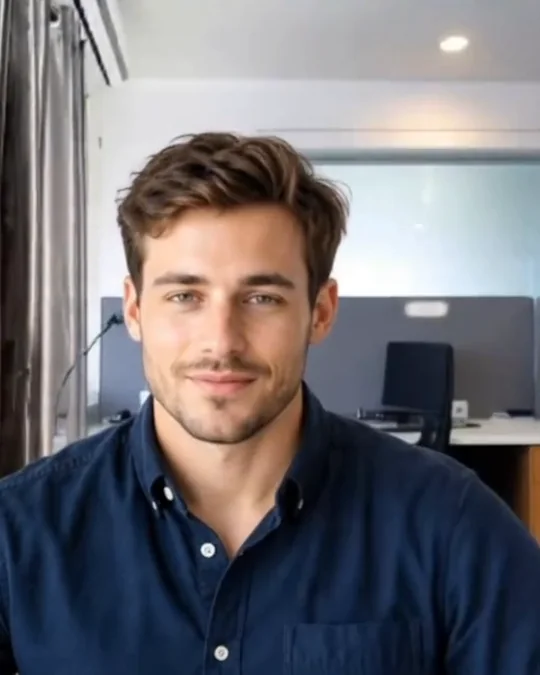
Real MorphCam output, recorded on Windows. Background lightly blurred, like a phone's portrait mode. Results vary with lighting and camera.
Works with the apps you already use
- Telegram
- Signal
- Zoom
- Google Meet
- Microsoft Teams
- OBS
From photo to live call in three steps
-
1
Upload a photo or type a prompt
Pick a face for your character, or describe the look you want, like "put me in an office".
-
2
Preview for free, then go live
Do your whole setup with Preview. It doesn't use any credits. Click Start when you're ready.
-
3
Choose MorphCam Camera in your call app
On Windows there's nothing else to install. On a Mac, the web app works with SplitCam or OBS.

 Character photo you upload
Live on camera: your movements
Your real camera: hidden
Character photo you upload
Live on camera: your movements
Your real camera: hidden
No SplitCam. No OBS. Just pick MorphCam Camera.
The Windows app now comes with its own camera. Open your call app's camera settings and choose MorphCam Camera (Windows Virtual Camera), or MorphCam Camera on Windows 10.
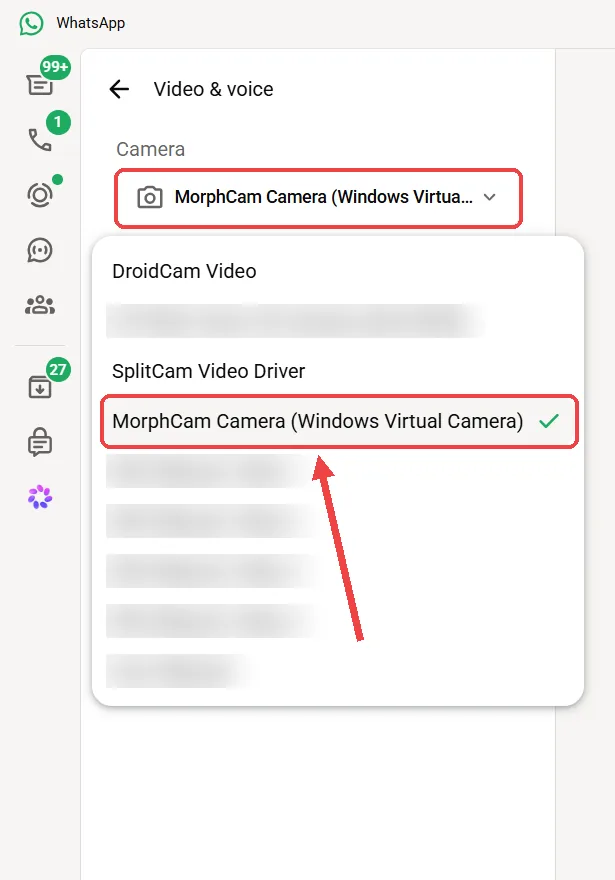
Where: Settings, then the calls/video settings, then Camera.
Choose: MorphCam Camera (Windows Virtual Camera).
WhatsApp only shows the Windows Virtual Camera, so it needs Windows 11. On Windows 10, use SplitCam.
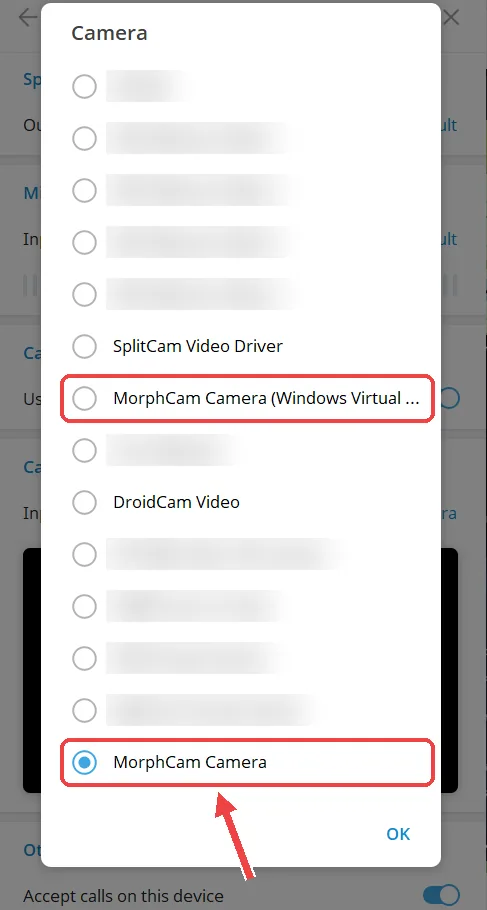
Telegram
Where: Settings, then Speakers and Camera, then Camera.
Choose: MorphCam Camera (Windows Virtual Camera). If it shows no picture, choose MorphCam Camera.
Zoom
Where: Settings, then Video, then Camera.
Choose: MorphCam Camera (Windows Virtual Camera). If it shows no picture, try MorphCam Camera.
Google Meet (and Microsoft Teams)
Where: the video or camera settings, before or during the call.
Choose: MorphCam Camera (Windows Virtual Camera). If it shows no picture, try MorphCam Camera.
Signal
Where: Settings, then Calls, then Video.
Choose: MorphCam Camera (Windows Virtual Camera). If it shows no picture, try MorphCam Camera.
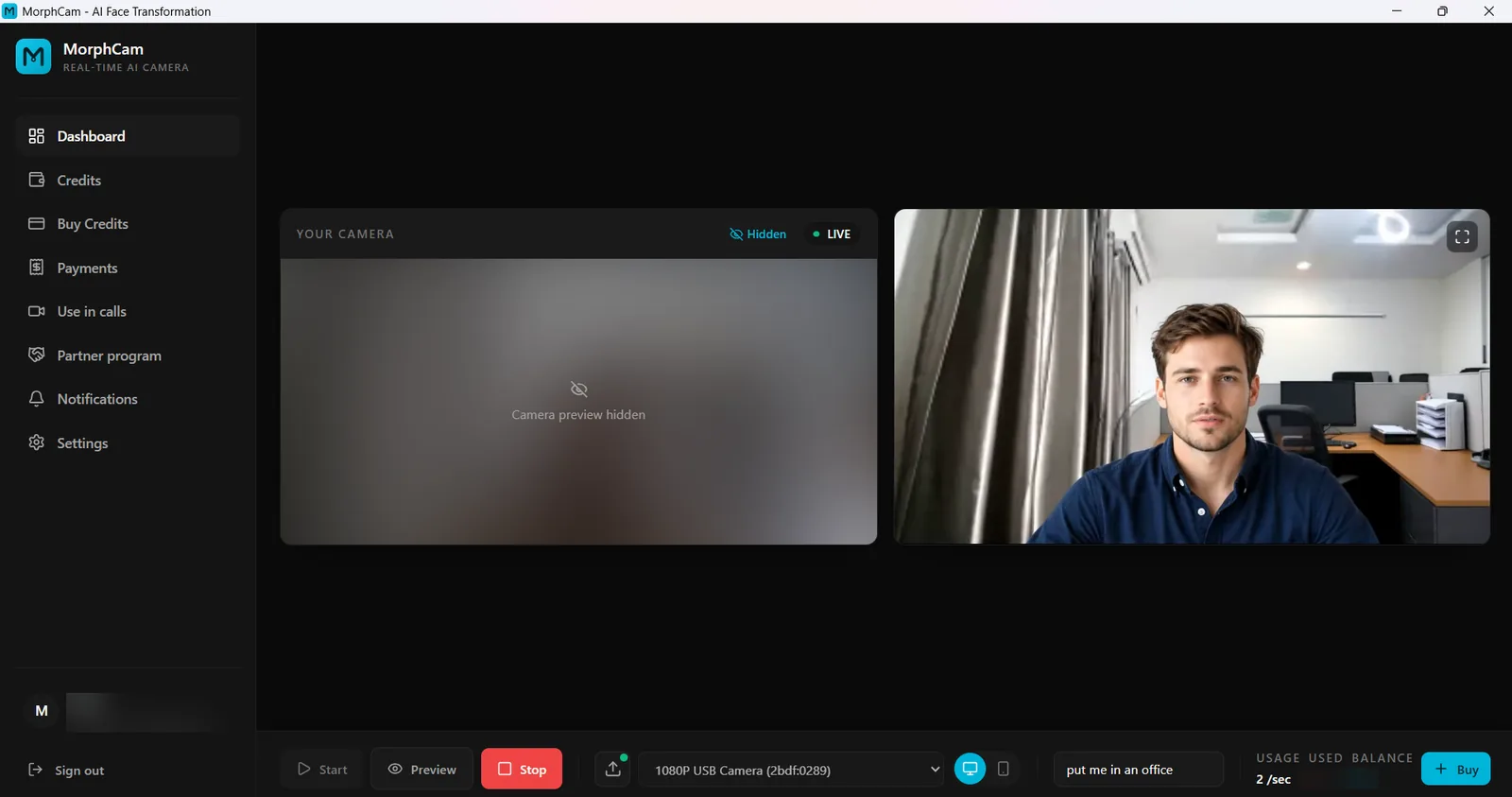 Your camera: hidden
What they see
Your camera: hidden
What they see
Stream without showing your real face. Even to yourself.
- Hide my camera preview keeps your real camera off your screen, which is perfect for streaming and screen recording.
- Your real camera and Preview are never shown in your call. The other person only sees your AI character.
- Minimise MorphCam or let your call app cover it. Your AI face keeps going.
Windows app or browser? Your choice.
Windows app
Windows 10 and 11 (64-bit)
- Built-in MorphCam Camera: no SplitCam or OBS
- Hide my camera preview for streaming and recording
- Keeps working when minimised or covered
Web app
Chrome, Edge or Safari
- Nothing to download: install it as an app from your browser
- Use SplitCam or OBS to bring it into your calls
- Sign in with the same MorphCam account
Simple, fair pricing
Camera preview is free. You only use credits while your AI is live: 2 credits per second, plus a 12-credit start fee each time you click Start. Credits never expire.
- Bitcoin
- USDT
- USDC
- ETH
- BNB
- Naira bank transfer
Crypto payments with no extra fees, added instantly. Or pay in Naira by bank transfer: prices are shown in Naira at our current rate, and our team confirms your receipt.
Love MorphCam? Earn when your friends buy.
Earn 10% on every purchase made by people you refer, and 15% from your 10th paying customer. They get 10% extra credits on their first purchase.
Made for fun and creativity. Never for fooling people.
Always say it's AI
Your audience should know they're watching an AI character. The character is the point.
Original characters, never real people
Use original AI characters. Never a real person's face, like a celebrity or someone you know.
Adults only. No fraud, ever.
You must be 18+. Scams, impersonation, KYC abuse and sextortion lead to a permanent ban, and we work with law enforcement.
Questions, answered
What is MorphCam?
MorphCam, the real-time AI character camera, turns your webcam into an AI character live for streams, videos and calls, always disclosed as AI. It runs as a Windows app with a built-in camera (MorphCam Camera) for WhatsApp, Telegram, Zoom and Meet, and as a web app for Mac and Windows at app.usemorphcam.com. The camera preview is free; live time uses credits.
Does MorphCam work on Mac?
Yes, in your browser. Open app.usemorphcam.com in Chrome, Edge or Safari, install it as an app, then use SplitCam or OBS to bring it into your calls. The Windows app adds the built-in MorphCam Camera. See the Mac steps.
Do I need OBS or SplitCam?
Not with the Windows app: just choose MorphCam Camera in your call app. With the web app (Mac or Windows) you need one small free program: SplitCam is the easiest, OBS also works.
Is the camera preview really free?
Yes. Preview does not use any credits, so you can do your whole setup first. Credits are only used while your AI is live: 2 credits per second, plus a 12-credit start fee each time you click Start.
How do I pay?
Buy credits in the app. The fastest way is crypto (Bitcoin, USDT, USDC, ETH or BNB): instant payments are added automatically, usually within a minute, with no extra fees. Pay in Naira by bank transfer. Prices are shown in Naira at our current rate. Upload your receipt and our team confirms it. You can also send crypto manually and upload a screenshot; our team approves it, which can take 5 hours or more.
Can the other person tell it's AI?
Always tell them. MorphCam is for original AI characters, used openly. Impersonating a real person or deceiving anyone is not allowed under our Acceptable Use Policy.
What does my computer need?
Windows app: Windows 10 or 11 (64-bit), a webcam (or your phone as a camera) and an internet connection. WhatsApp needs Windows 11 to show MorphCam Camera. Web app: a Mac or Windows computer with Chrome, Edge or Safari.
Ready to meet your AI self?
Download the Windows app or open MorphCam in your browser. The camera preview is free.